IQ Booster: Brain Games & Test
- 4.5
- Rating
- 100.00K
- Installs
- Free
- Price

 Analysis by App-foxy
I tried IQ Booster: Brain Games & Test as a compact education app for people who want to exercise memory, attention, reasoning, emotional awareness, and related thinking skills in one place. My first impression was that it is easier to approach than a traditional study tool: you can open it for a short mental workout instead of committing to a lesson, a book, or a long course. That makes it appealing for a spare moment during a commute, before work, or when I want something more purposeful than casually scrolling.
At the same time, I would not treat it as a scientific measure of intelligence or as a replacement for professional assessment. Its value is in giving you structured mental challenges and a way to notice how you perform from session to session. The app is free to install, while optional purchases range from $6.99 to $39.99 per item, so the important question is whether its style of practice suits you before spending anything.
How the current version feels in everyday use
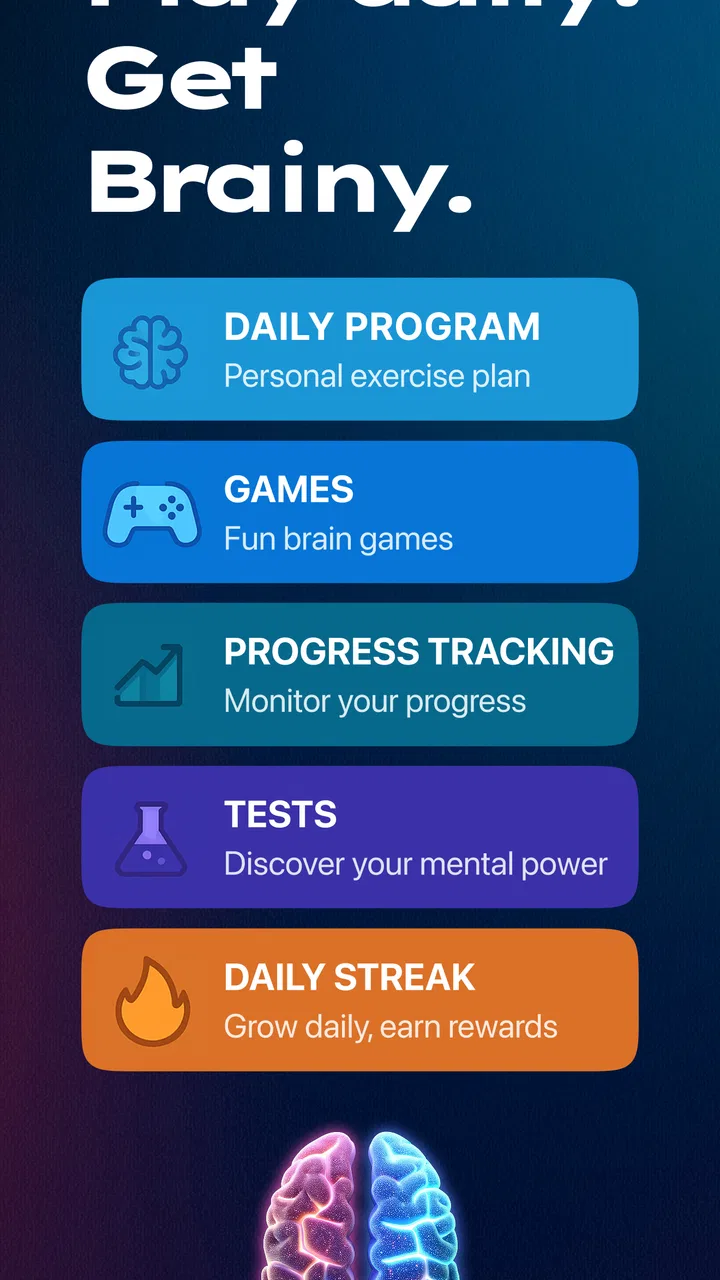
The current release is version 1.1.7, and the app comes from HubX. It is listed in the Education category, but it feels closer to a collection of short cognitive exercises than to a conventional classroom product. That distinction matters. You will not open it expecting chapters, explanations, or a guided academic curriculum. Instead, the attraction is variety: memory-focused activities, brain-training challenges, EQ-oriented material, and ADHD-related tests are brought together under one mental-fitness idea.
You May Also Like

 Blood Strike: 2.5 Anniversary
Blood Strike’s Loadouts Turn Every Drop Into a Tactical Gamble
A close look at Blood Strike’s custom loadouts: how fast access to signature weapons reshapes its battle royale rhythm, rewards preparation, and narrows the gap between fights.

 Pandora - Music & Podcasts
Pandora’s Music Is Easy to Start, but Harder to Recover
Pandora’s strength is its low-effort path from a seed to a station. Its weak spot is how much confidence it asks you to place in connection, setup, and quiet recovery.

 8 Ball Pool
 Is Built on Rivalries, Rematches, and Routine
A close look at the rivalries, rematches, shared routines, and unanswered safety questions that turn a quick pool match into a persistent mobile community.

 Samsung Music
’s Quiet Strength Is Playing What You Already Own
Its reach comes less from spectacle than from dependable access to a personal library. That simplicity is both the app’s strongest retention engine and its ceiling.

 AccuWeather: Weather Radar
AccuWeather Review: A Quick, Clear Forecast for Everyday Decisions
For everyday plans, the best forecast is the one you can understand quickly. AccuWeather makes rain timing, radar, and local conditions easy to act on, with a few trade-offs.

 Hill Climb Racing
Why Hill Climb Racing Still Turns Crashes Into One More Run
A tiny car, a bumpy hill and one more upgrade: Hill Climb Racing keeps resurfacing because its simple chaos makes every near-miss feel personal.
More From Our News Desk
View All News


I found that format useful when I wanted a clear starting point. A normal puzzle app may give me entertainment, while a general learning app may require choosing a subject and following a longer path. Here, the purpose is immediately understandable: test or exercise a particular aspect of thinking. The short-session design also lowers the barrier to returning. I could use it as a five-minute reset rather than waiting for a quiet evening.
The app is free and suitable for Everyone, which makes it approachable for households with different ages and for users who are simply curious. It supports Android 7.0 and later, so compatibility is broad enough for many older devices. That does not make every exercise equally suitable for every person, though. Younger users may need help interpreting test-style results, while adults should avoid turning a single difficult session into a judgment about their abilities.
The public response is encouraging: it has a 4.6 average from around 3,300 ratings, with more than 100,000 installs. I read those figures as evidence that the concept is attracting real interest, not as proof that it will improve everyone’s IQ. Mental performance changes with sleep, stress, familiarity, screen conditions, and motivation. A good score can be satisfying, but it needs context.
The best way to approach the exercises
My strongest recommendation is to use the app as a routine, not as a one-time verdict. If you open it only to chase a high result, you may end up learning the format of a particular challenge rather than improving a broad skill. A better workflow is to choose one area, complete a session when you are reasonably alert, and make a brief note of how focused you felt. Repeating that process gives the results more meaning than comparing two random attempts made under completely different conditions.
There is also a practical benefit to rotating activities. Memory tasks can feel rewarding because progress is easy to notice, while reasoning tasks may expose a slower, more deliberate style of thinking. EQ material invites a different kind of reflection altogether. I would not judge the whole app by the area that feels least natural. Instead, use the variety to identify whether you prefer recall, pattern-based problem solving, self-reflection, or attention challenges.
One non-obvious tip is to avoid using it immediately after a distracting activity if you want a fair comparison. Notifications, tiredness, and rushing through instructions can affect performance more than the exercise itself. I also found it sensible to stop when concentration drops. Continuing simply to complete a target can turn a useful workout into frustrated tapping, which makes the result less helpful.
What the app does well for different users
For a student, the app can work as a quick change of pace between study blocks. It will not teach algebra, vocabulary, history, or another school subject, but a short memory or reasoning challenge can provide a deliberate break. I would keep the session separate from revision rather than pretending it replaces revision. The useful role is mental variety and self-observation, not subject mastery.
For an office worker, the strongest use case is a small reset before a demanding task. I can imagine opening it after lunch, completing one challenge, and then returning to email or planning with a clearer boundary between rest and work. That routine is more realistic than promising a dramatic transformation. The app is especially suitable for someone who likes measurable, game-like prompts but does not want a full productivity system.
For parents, the Everyone rating makes the app easier to consider for shared use, but I would still encourage discussion around results. A child who performs poorly one day may simply be tired or unfamiliar with the task. The app can start a conversation about memory strategies and concentration; it should not become a scoreboard inside the family.
People interested in ADHD-related tests should be particularly careful with interpretation. A test inside an app may help someone reflect on attention patterns or decide to discuss concerns with a qualified professional, but it cannot establish a diagnosis by itself. I appreciate having that area represented, yet I would use it as a prompt for questions, not as a medical conclusion.
How it compares with familiar alternatives
Compared with a standard puzzle game, this app has a clearer learning and self-checking angle. A puzzle game may be better if you mainly want a story, competition, or relaxing entertainment. IQ Booster is more appealing when you want the activity to feel connected to memory, thinking, or emotional skills. The trade-off is that users who prefer deep, handcrafted puzzles may find a broad training collection less satisfying than a specialist game built around one mechanic.
Compared with a meditation app, it is more active and performance-oriented. Meditation is usually the better choice when the goal is calming down, regulating stress, or building a quiet daily habit. This app asks you to respond, remember, decide, and evaluate. That can feel energizing, but it may be the wrong option when your mind needs rest rather than another challenge.
Compared with flashcards or language-learning software, it offers wider cognitive variety but less subject-specific depth. If I wanted to remember medical terms, prepare for an exam, or learn a language, I would choose a dedicated study tool. If I wanted several types of short mental exercise without selecting one academic subject, this app would make more sense.
There is also a difference between this kind of app and a clinical or professionally administered assessment. The former is convenient and approachable; the latter is designed for formal interpretation. That is not a flaw in IQ Booster, but it is an important boundary. Its tests can be interesting and useful for personal reflection while still being unsuitable for high-stakes decisions.
What has changed, who benefits, and what still needs attention
When I think about how this app might fit into a household, the useful question is less whether everyone can try it and more how each person can keep the experience meaningful. I’d treat sessions as individual practice, agree on a simple turn-taking routine for a shared device, and avoid comparing scores across different ages or circumstances. That boundary helps keep curiosity at the center while leaving room to consider what setup and coordination actually require.
Reading the release and product maturity
The app was released on May 27, 2025, and version 1.1.7 shows that it is still a relatively young product rather than a long-established learning platform. I see that as a mixed signal. A newer app can feel focused and open to refinement, but it may also have a less settled identity than a mature specialist tool. The current version is the one I would judge, while treating future development as something to watch rather than something to assume.
Because the release history available to users is limited to the current version and release date, I would not claim that a particular update transformed the experience or introduced a named feature. What I can say is that the present build positions the app around a broad mix of cognitive training, EQ exploration, and ADHD-related tests. That combination gives it a wider scope than a single-purpose memory trainer, but it also raises the bar for consistency across all sections.
For existing users, the practical effect of a newer version is less about learning a new system and more about checking whether the current flow remains comfortable on their device. If you already use it, I would keep your own notes about which exercises feel useful and whether the app supports the routine you intended to build. Personal consistency is more informative than assuming every release will automatically improve results.
Where the experience can fall short
The broad subject range is also the main limitation. Memory, general brain training, EQ, and ADHD-related tests do not all measure the same thing. Putting them together is convenient, but it can encourage users to treat one combined impression as a complete picture of their mind. I would prefer to think of each area as a separate lens and resist reducing everything to one label.
Another friction point is the presence of in-app purchases. The app is free to start, but optional items cost between $6.99 and $39.99 each. That pricing range makes it sensible to explore the free experience carefully before buying. I would ask myself whether I am paying for a feature I will use repeatedly or simply reacting to a disappointing score or a moment of enthusiasm.
The app may also be less satisfying for someone who wants detailed explanations after every answer. A challenge can tell me that I struggled, but the real learning value depends on what happens next: do I understand the mistake, can I adjust my strategy, and can I apply that adjustment later? If your priority is instruction rather than practice, a course, textbook, or tutor may offer more depth.
Users who dislike timed pressure should consider that before committing to a routine. Even when an exercise is useful, a test-like presentation can make some people focus on speed instead of accuracy. I would choose sessions when I can concentrate and treat the result as a snapshot. If the experience makes you anxious, there is little benefit in forcing daily use simply because the app is designed around repeated practice.
Three practical workflows I would actually use
Use it as a controlled break. I would pick one short activity between work or study blocks, then return to the original task instead of letting the app become an endless detour. This preserves its value as a reset and prevents a quick exercise from consuming the time it was meant to protect.
Separate testing from training. I would reserve occasional sessions for checking how I perform and use other sessions for practice. Mixing both purposes makes it difficult to know whether a later result reflects improvement, familiarity, or simply a better day.
Keep health-related concerns outside the score. If an ADHD-oriented test raises a concern, I would write down the specific everyday situations behind that concern and discuss them with a qualified professional. I would not use the in-app outcome as a diagnosis or as a reason to change treatment.
These workflows also answer a common question: does the app need to become a daily habit to be worthwhile? No. Daily use may suit someone who enjoys repetition, but occasional, intentional sessions can be more appropriate for a busy person or anyone who becomes overly focused on scores. The right frequency is the one that supports curiosity without creating pressure.
What I would watch in future development
As the product evolves, I would pay attention to how clearly it explains the purpose and limits of each test. The more areas an app covers, the more important it becomes to distinguish a game-like exercise from a meaningful assessment. Clear context would help users understand what they are practicing and avoid drawing conclusions that the activities cannot support.
I would also watch whether the experience becomes more useful between sessions. A strong long-term tool should help users notice patterns, choose an appropriate next activity, and understand mistakes rather than merely collect scores. That does not require turning the app into a complicated course; even thoughtful guidance around practice could make the broad selection feel more coherent.
Finally, I would look for a balance between free access and paid content. Since the app already lets people begin without paying, the first session should give a fair sense of its quality and style. Purchases make more sense when they support a clear, repeated use case. They make less sense when the user feels pushed to unlock an answer to a single disappointing result.
My recommendation after using it
I recommend IQ Booster: Brain Games & Test to anyone who wants approachable, short cognitive activities and enjoys checking different aspects of mental performance. Its broad mix is its most distinctive strength: it can move from memory to reasoning, emotional awareness, and attention-related reflection without requiring several separate apps. The free entry point and Everyone rating also make it easy to try responsibly.
I would skip it if you need formal intelligence testing, clinical ADHD evaluation, detailed academic teaching, or a calm meditation routine. I would also avoid paying immediately. Start with the free experience, decide which type of activity you genuinely return to, and only then consider whether an in-app purchase fits your habits.
My overall view is positive but measured. This is a convenient education app for building a small mental-exercise routine, not a shortcut to a higher IQ and not a definitive report about who you are. Used with realistic expectations, it can turn idle minutes into focused practice. Its long-term value will depend on how well the current broad concept develops into clearer feedback, better continuity, and a more useful relationship between each test and the person taking it.
FAQs for IQ Booster: Brain Games & Test
01What types of games are included in IQ Booster: Brain Games & Test?
IQ Booster offers a diverse range of games designed to challenge various cognitive skills. These include puzzles, memory games, logic challenges, and math quizzes. Each game is crafted to engage different parts of your brain, helping to improve critical thinking, problem-solving, and mental agility.
02Is IQ Booster suitable for all age groups?
Yes, IQ Booster is designed to be accessible to a wide age range. It offers varying levels of difficulty to accommodate both younger users and adults. However, parents should review the content to ensure it aligns with their expectations, especially for younger children.
03Does IQ Booster require an internet connection to play?
While some features of IQ Booster may require an internet connection, many of the games can be played offline. This makes it convenient for users who want to engage with the app on the go, without worrying about data usage or connectivity issues.
04Are there in-app purchases in IQ Booster?
IQ Booster does include in-app purchases. These can be used to unlock additional game packs, remove ads, or gain extra hints. It's important for users to be aware of this, especially if children have access to the app, to avoid unintended purchases.
05How does IQ Booster track and measure progress?
IQ Booster includes a progress tracking feature that allows users to monitor their improvements over time. It records scores, highlights areas of strength, and suggests areas for improvement, providing a comprehensive view of cognitive development and skill enhancement.
Pros
- Engaging and varied puzzles.
- User-friendly interface.
- Regular updates with new games.
- Enhances cognitive skills.
- No intrusive ads.
Cons
- Limited free levels.
- Requires internet connection.
- Occasional loading delays.
- In-app purchases needed for full access.
- High battery consumption.

IQ Booster: Brain Games & Test
Gallery